TABLE OF CONTENTS
- The Cypher System Digital Character Sheet v1.5
- How to Use the Digital Character Sheet
- Understanding and Using the DCS
- Basic Structure
- “Header” or Character Sentence
- / Stats /
- / Skills /
- / Abilities /
- / Player Intrusions /
- / Minor & Major Effects /
- / Equipment /
- / Advancement /
- / Background and Story /
- Naming Conventions and Best Practices
- Optional “Tick Boxes” for Pool Points
- Setting Up Your Text Editor for DCS
- Sharing a DCS File
- Downloadable DCS .txt Template
1. The Cypher System Digital Character Sheet v1.5
This Digital Character Sheet is a format for .txt files for use with Cypher System games. You can use any basic text editor to keep track or make use of file formats like Markdown for some extra formatting. Follow the guidelines and style guide on this page in case of any confusion.
Character is a Descriptor Type who Focuses

	Descriptor (Source)
	Type (Source)
	Focus (Source)

/ Stats /

	Tier:
	Effort:
	XP:

	Might:
	Speed:
	Intellect:

	Armor:

	Recovery Rolls: 1d6+
	[] Action
	[] Ten Minutes
	[] One Hour
	[] Ten Hours

	Cypher Limit:

/ Skills /

	Trained Skill (t); Pool
	Specialized Skill (s); Pool
	Inability (i); Pool

/ Abilities /


	Ability Name (Source); Pool cost; activation info (Action, Enabler, etc.)

/ Player Intrusions /

	Name (Source)

/ Minor and Major Effects /

	Name (Source)


/ Equipment /

	Item
	Weapon; type, mod, damage, range

	CONTAINER
		Stuff inside container

	ODDITIES

	CYPHERS

	ARTIFACTS

	CRAFTING MATERIALS

/ Advancement /

	Tier #:
		[] Advancement 1
		[] Advancement 2
		[] Advancement 3
		[] Advancement 4

/ Background and Story /

/ Cypher System DCS v 1.5 /

Designed by THE INFINITE CONSTRUCT

//
Numenera, the Cypher System, No Thank You, Evil!, Invisible Sun, and their respective logos are trademarks of Monte Cook Games, LLC in the U.S.A. and other countries. All Monte Cook Games characters and character names, and the distinctive likenesses thereof, are trademarks of Monte Cook Games, LLC. Content derived from Monte Cook Games publications is © 2013-2021 Monte Cook Games, LLC.
2. How to Use the Digital Character Sheet
The Digital Character Sheet (DCS) is nothing more than a format for .txt, or similar, files to enable simple, straightforward access to important character information, ease of sharing, isn’t locked to a VTT service, doesn’t require any software beyond a text editor to use, and can be printed with very minimal ink usage.
The Digital Character Sheet is intended to be pretty self-explanatory, but this page will cover all you need to know to use it in your games, including setting up text editing software native to Mac and Windows platforms. At the bottom of this page are downloadable .txt files for your use.
3. Understanding and Using the DCS
The DCS is intended to be straightforward, with no high-ink requirements for printing, no need for a “form-fillable” version, and doesn’t require a PDF editor/reader.
The DCS is broken up into separate sections, each detailed on this page. The DCS is great for “theater of the mind” games that don’t rely too much on visualization, but it can also serve as a solid permanent record of your character and their advancements, independently of official, artwork-heavy sheets, and VTT services like Roll20.
This page also includes a “best practices” approach to building, detailing, and cataloging character sheets over the course of a campaign.
You are free to make any adjustments or changes to the look, layout, and way in which this information is presented in your own games. If you distribute your changes, please be sure to adhere to Monte Cook Games’ Fan Use Policy and indicate your contribution to the form under the “Designed by” section. This will guarantee adherence to the Fan Use Policy, as well as keep a record with appropriate attributions should your additions take on a life of their own.
4. Basic Structure
The DCS is divided into different “Sections” each indicated by the name of the Section placed between two forward slashes, i.e. “/ Stats /” or “/ Skills /”. The contents of each section are then indented (or 5 spaces) to aid with legibility, but to also allow printed versions of this to have space for quick notes, and adjustments during the course of the game.
This is done to clearly indicate a specific Section, provide a touch of formatting style, but also clear the way for any formatting changes you may wish to make should you convert this to a different format such as Markdown, HTML, etc.
The DCS aims to give you the info you need and get out of your way when you need to jot something down quickly, or add a quick change.
Given the ease of sharing a character sheet that’s mere kilobytes in size, and with respect to how copyrighted material can swiftly be transferred in this way, the DCS prioritizes citation over definition. It uses an adapted version of the MLA form of citation often used for academic writing. This is done to mitigate heavy use of commas, periods, and unnecessary abbreviations of the word “page.”
If, for example, you are citing the Descriptor “Imaginative,” found on page 47 of Numenera: Destiny, you may simply cite it as: (Destiny 47). Again, the goal here is to avoid unnecessary punctuation and letters. If you were citing the Tier 2 ability for the “Controls Beasts” Focus found in Numenera Discovery, it should be cited as (Discovery 62). Try to use the page number associated with the printed document, not the PDF file’s document page number. This helps guarantee parity with printed materials (and most PDF documents tend to add between 2 and 4 pages to the count, so page 62 in the printed version of a book will likely show up as 64 in the PDF reader’s page count).
Specific changes or additions to the citation are addressed in their appropriate sections.
5. “Header” or Character Sentence
At the very top of the DCS is the character sentence in the following format: “Character is a Descriptor Type who Focuses.”
Character will be replaced with your character’s name, followed by the necessary three parts of your character in the Cypher System.
Indented below this are the citations for where the Descriptor, Type, Focus may be found. This doubles, in a way, as a section that indicates all the necessary books used to construct the most basic elements of this character (though some abilities, and especially cyphers and other equipment, are likely to have other sources.)
Heroic (Destiny 46)
Glaive (Discovery 28)
Defends the Weak (72)
6. / Stats /
The Stats section indicates the numerical values that have the most influence over your character as a mechanical entity in the game.
Here you will want to list the following, in the following groups.
Tier, Effort, and XP are indicated, followed by the Pool maximums of Might, Speed, and Intellect. After your Pool maximum number, the stat’s related Edge is listed in parenthesis:
Might 20 (Edge 2)followed by your Armor score (I also like including another line indented further, and just under Armor, that explains the conditions and source of the armor, such as:
Armor: 1
     only against slashing and piercing attacks
     + 1 when making an audible sound
This is followed by the character’s Recovery Roll formula and then the options for taking a Recovery Roll listed below, with two brackets facing each other to be filled out with an X, or checked off if printed, to indicate this has been used. If a character has any changes to the time it takes them to make a recovery roll (if an ability turns the first two Recovery Rolls into “Actions”, for example), this change may be reflected here, for example:
Recovery Rolls: 1d6+2
[] Action
[] Action
[] One Hour
[] Ten Hours
Lastly, the Stats section ends with the maximum amount of cyphers the character may carry at any given time.
7. / Skills /
The Skills section is featured after the Stats as it very immediately affects task difficulty levels in the game.
Skills are listed here, one line at a time, with the skill name, followed by the letter of its level of “training” in lower-case in parenthesis. After a semi-colon, the related Pool is listed.
History (t); IntellectThe trained status is indicated in lower case to prevent confusion between an upper case “I” and a lower case “l”.
(t): trained
(s): specialized
(i): inability
If you want, you can put a line of space between skills that are “trained,” “specialized,” or are an “inability”
Positive social interactions (t); Intellect
Using esoteries (t); Intellect
Understanding numenera (t); Intellect
Peacefully opening communications (t); Intellect

Crafting numenera (s); Intellect

Salvaging numenera (i); Intellect
Skills that draw from a choice of Pools can just be indicated with a slash, “Might/Speed,” as an example.
Medium bladed attacks (t); Might/Speed8. / Abilities /
The abilities section lists all of your characters abilities. If you want, you can include attacks here, as well as abilities that only grant skills or increase Pool points. In home games, you may wish to include the ability information under each listing, but when sharing sheets, you should stick to this format for indicating citation, as well as point cost, and ability type:
Fleet of Foot (Discovery 31); +1 Speed; Enabler
Shield Bash (Character Options 8); 3 Might; Action
The structure of this should be: Ability Name (Citation); Point Cost; Ability Type.
This is done to clearly state the name, where it comes from, how much it costs, and how it is activated.
If you want to indicate what the ability does, I often introduce a second line under this format indicating text from the book or my own paraphrasing of it.
Ability Name (Citation); Point Cost; Activation
     Second line, indented, indicating everything that is needed to know about this ability and what it does.
You may choose to, similar to skills, divide this section up into “Actions” and “Enablers” or come up with any other way that makes sense to sort the character abilities you need represented on your sheet.
9. / Player Intrusions /
This section lists Player Intrusions in an “ability-style” format. While intrusions are often improvised, players may wish to list the ones suggested by their Type, as well as ones they’ve used in the past to success.
Player Intrusion (citation); 1 XPSimilar to the abilities, you may wish to include more information about what your specific player intrusion concept does.
10. / Minor & Major Effects /
In Numenera, every focus is given a set of suggestions for their minor and major effects. There is a list of general suggestions on page 105 of Numenera Discovery. You may list any of these and any others you can think of in this section.
11. / Equipment /
This section lists all of your character’s equipment, including cyphers and similar objects. Weapons follow a format, which starts with the weapon name, followed by the type, its modifications (how much its use eases or hinders the task to hit) and the damage, followed by the range:
Battle axe; medium, 4, immediate
Dagger; light, eased, 2, short (thrown)
Containers such as the “Explorer’s Pack” may be written in all caps with the contents listed in an indented series of lines under this. You may do this for all oddities, cyphers, artifacts, and crafting materials (I include numenera plans under crafting materials).
12. / Advancement /
The advancement section includes a record of all advancements this character has earned. Start with the Tier number, and then with an indented series of lines underneath this entry, list all of the advancements this character has earned for that Tier. You may wish to include facing brackets to form a “checklist” for digital and printed copies.
Tier 1:
    [] Increasing capabilities
    [] Moving toward perfection
    [] Extra effort
    [] Other option: Skill with Defense (ability)
Tier 2:
    [] Other option: Quick Recovery
13. / Background and Story /
You may use the final section for any notes or essential background and story info you feel is necessary for this character.
14. Naming Conventions and Best Practices
I prefer to create a new version of this document for the same character every time they advance, this would mean that a maxed out character will have 24 different files by the end of their career. The relatively low size of these files makes storage not an issue, as is the ease of simply pressing Ctrl + A followed by Ctrl + C (or Command on Mac) in the character sheet to bring all the info into a new document to be updated with a simple paste function.
In order to indicate what Tier and level of advancement a character is, I use the following name convention: Name Tier Number.Advancement. Here’s an example with a Tier 2 character who has one advancement toward the next tier:
Aloy 2.1If Aloy sorted all of her character sheet file names for Tier 1, it would look like this:
Aloy 1.0.txt
Aloy 1.1.txt
Aloy 1.2.txt
Aloy 1.3.txt
There is no .4 category even though there’s a fourth advancement option since it’s assumed that once all 4 advancements have been made, the character automatically moves to the next Tier. This is unless your campaign has specific criteria such as milestones, advancement XP, or otherwise, where a “1.4” character could reasonably exist.
If we added up all the file names for Aloy once she reaches sixth tier, it would look like this (I use separate folders in the operating system for each Tier):
TIER 1
Aloy 1.0.txt
Aloy 1.1.txt
Aloy 1.2.txt
Aloy 1.3.txt
TIER 2
Aloy 2.0.txt
Aloy 2.1.txt
Aloy 2.2.txt
Aloy 2.3.txt
TIER 3
Aloy 3.0.txt
Aloy 3.1.txt
Aloy 3.2.txt
Aloy 3.3.txt
TIER 4
Aloy 4.0.txt
Aloy 4.1.txt
Aloy 4.2.txt
Aloy 4.3.txt
TIER 5
Aloy 5.0.txt
Aloy 5.1.txt
Aloy 5.2.txt
Aloy 5.3.txt
TIER 6
Aloy 6.0.txt
Aloy 6.1.txt
Aloy 6.2.txt
Aloy 6.3.txt
Aloy 6.4.txt
15. Optional “Tick Boxes” for Pool Points
You may wish to use a row of facing brackets to create tick boxes for keeping track of pool points. This aids in keeping track of how many more points until a Pool is depleted. Such an example would look like this:
Might: 15 (Edge 1)
[][][][][][][][][][][][][][][]
Speed: 17 (Edge 2)
[][][][][][][][][][][][][][][][][]
Intellect: 10
[][][][][][][][][][]
16. Setting Up Your Text Editor for DCS
For the most part, just about any text editor that comes with an operating system can be used for creating, viewing, and using this character sheet format. There are a couple of things you may wish to have checked off or setup, prime among them is turning on “Word Wrapping”
In Notepad on Windows, on the drop down menu under “Format,” be sure “Word Wrap” is checked off:

In TextEdit on Mac, there are two options (though one is optional). In TextEdit’s Preferences (accessible by pressing Cmd + , while in TextEdit, or selecting “Preferences” from the app’s main drop down menu.
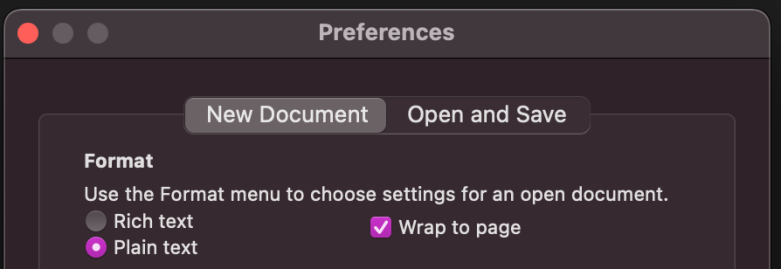
While you may wish to use the formatting options afforded by the Rich text default, Plain text is not only cleaner, but will keep your DCS as a .TXT file instead of an .RTF. Regardless of your decision here, make sure wrap to page is checked off.
You may also use Apple’s Notes app, which works excellent on mobile. There are a wide variety of text editors out there which offer different style options you may enjoy. Generally speaking, these will all work pretty easily so long as word wrap is turned on; you may wish to turn off “Line Numbers” on some apps.
17. Sharing a DCS File
A DCS is likely to be merely kilobytes, and so can be sent easily in email or messenger apps like Discord.
On a computer, Discord happens to be a fantastic way to share these sheets, and make sense given the amount of online gaming done on the platform.
Sending a .txt file in Discord creates a preview which looks like this:
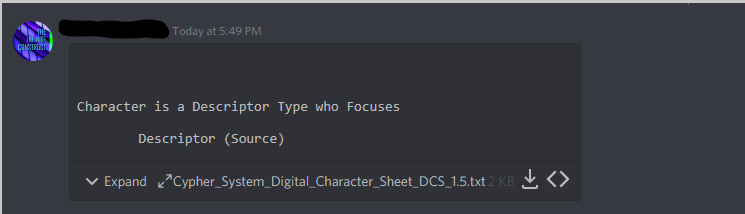
It may also be expanded into a full preview:
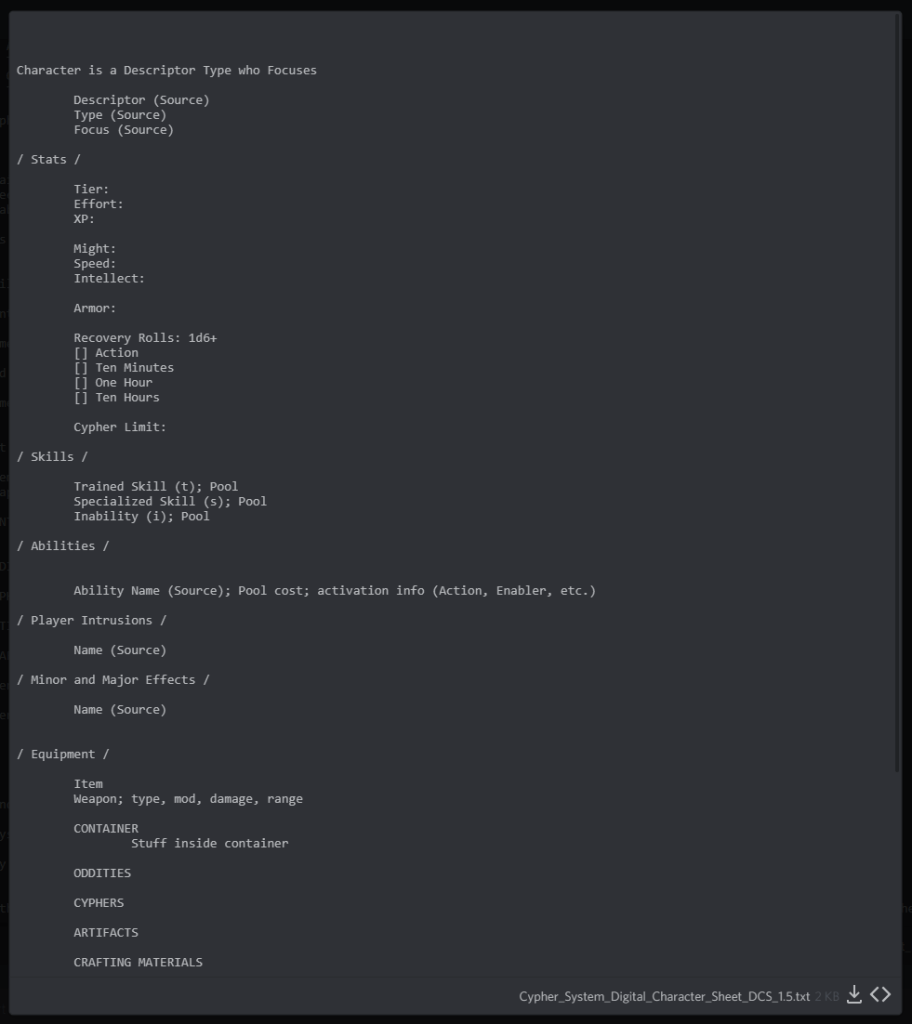
This makes viewing and downloading a character sheet in Discord super easy, without worrying about size limitations, or links to Roll20 games, etc. NOTE: the text preview in Discord has word wrap turned off, so some portions may look strange depending on how you formatted your entries.
18. Downloadable DCS .txt Template
Download the Template .txt file here.
Digital Character Sheet Template (Google Drive Download)
//
The Monte Cook Games logo, Numenera, the Cypher System, No Thank You, Evil!, Invisible Sun, and their respective logos are are trademarks of Monte Cook Games, LLC in the U.S.A. and other countries. All Monte Cook Games characters and character names, and the distinctive likenesses thereof, are trademarks of Monte Cook Games, LLC. Content on this site or associated files derived from Monte Cook Games publications is © 2013-2021 Monte Cook Games, LLC. Monte Cook Games permits web sites and similar fan-created publications for their games, subject to the policy given at https://www.montecookgames.com/fan-use-policy/. The contents of this site are for personal, non-commercial use only. Monte Cook Games is not responsible for this site or any of the content, that did not originate directly from Monte Cook Games, on or in it. Use of Monte Cook Games’s trademarks and copyrighted materials anywhere on this site and its associated files should not be construed as a challenge to those trademarks or copyrights. Materials on this site may not be reproduced or distributed except with the permission of the site owner and in compliance with Monte Cook Games policy given at https://www.montecookgames.com/fan-use-policy/.
 THE INFINITE CONSTRUCT